Free AI Seating Chart Generator for Weddings, Banquets & Events
Create professional seating charts for weddings, classrooms, banquets, conferences, and special events in minutes. Simply describe your venue or paste your guest list. Veeso AI automatically generates a clean, printable seating chart that's fully editable.
Three Ways to Generate Custom Seating Layout
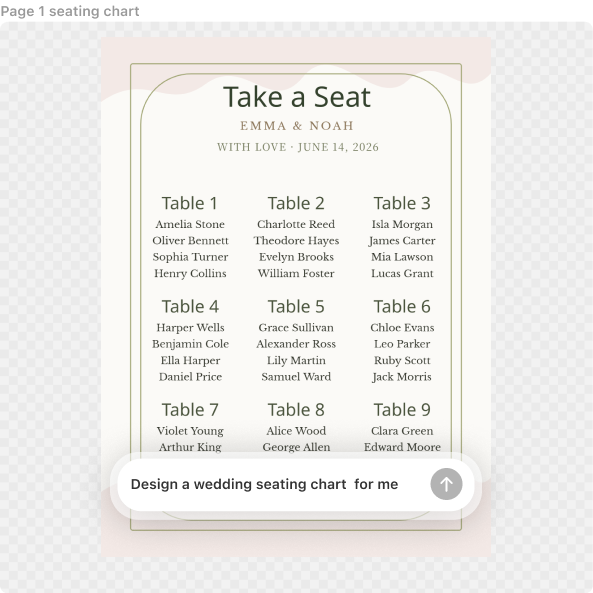
Generate Seating Charts from Event Details
Describe your venue, guest count, table types, or classroom layout. Veeso AI automatically organizes your information into a clear seating chart.
- Describe your theme and vibe
- Automatic table alignment
- Custom 18x24 poster sizes
- High-contrast font choices
Create Seating Charts with Magic Templates
Choose a seating chart style that matches your event. Instead of editing a fixed template, Veeso learns the layout structure, spacing, and visual hierarchy to generate a brand-new seating chart around your own guest list.
- Event layout style references
- Playful birthday arrangements
- Organized classroom clusters
- AI seating layout adaptation
Turn Guest Lists into Seating Charts
Already have your guest list in Excel or Google Sheets? Paste your attendee names and seating assignments. Veeso automatically builds a professional seating chart without manual formatting.
- Import Excel guest lists
- Auto-alphabetize attendee lists
- Tag VIP or head tables
- Export to high-res PDF
Why choose Veeso for your Pro-Grade Event Floor Plan
Design Around Your Guest List
Traditional seating chart tools make you manually drag names into templates. Veeso AI understands your guest list first, then creates an organized seating layout automatically.
Try It Free
Quick attendee list Edits
Someone dropped out at the last minute? No sweat. Use this editable table seating chart template to swap names in seconds without ruining the layout.
Try It Free
Pro-Grade Event Floor Plan Layouts
Veeso AI handles the spacing so your dance floor and buffet don't overlap. You get a balanced, logical flow that makes sense for your venue's entrance.
Try It Free
Printable Seating Chart Template Specs
Avoid those awkward cropped edges at the print shop. You'll get built-in bleed margins and professional PDF exports ready for any local or online printer.
Try It Free
Who Needs a Best Free Seating Chart Tool Today?
Custom Wedding Seating Charts
Map out your reception floor plan in minutes. Add the dance floor and DJ booth. Group your college friends together easily. Export as a high-res PDF for your local print shop.
Classroom Seating Chart Generator
Organize your room to keep kids focused. Drag and drop student names to different desks. Print a clean layout for your substitute teacher's binder. Keep your classroom management on point.
Professional Event Floor Planner
Planning a big industry banquet? Veeso AI builds a structured layout for your attendee list. Include VIP tables near the stage. It looks like you hired a pro designer.
Random Seating Chart Generator
Shake things up at your next mixer. Automatically shuffle guests to new tables. Break the ice and encourage new connections. Download a printable version to post at the entrance.
Seating Chart for Birthday Party
Got a huge family coming over? Assign tables so everyone finds their spot fast. Add cute table names instead of just numbers. It makes a big party feel way more organized.
Printable Seating Chart Template
Ensure your venue has a smooth traffic flow. Visualize spacing between tables and the buffet. Keep exit points clear for safety. Print a large-scale copy for your catering staff.
Why Event Planners And School Administrators Choose Veeso AI
I had a massive gala with 30 tables. I just pasted my attendee list. The layout looked sharp and professional instantly. My client loved the PDF export for their printer.

Setting up my classroom used to take hours. Now I just generate a new seating plan online. It helps me manage behavior by moving kids around quickly.

Veeso AI handled my last-minute wedding guest changes flawlessly. I updated the table assignments and reprinted the chart. The 300 DPI quality made the tiny text look crisp.

How to Create High-Converting Print-Ready Seating Visual
Paste Your Guest List or Describe Your Event
Upload attendee names or describe your venue, table count, and seating requirements.
Customize your printable seating chart template
Move tables, change fonts, and pick colors that match your event. Ensure the guest flow makes sense for the venue entrance.
Download Your Print-Ready Wine Label
Hit download and grab a 300 DPI PDF with bleed margins. It is ready for the local print shop or a digital display.
FAQ

Ready to Create Beautiful Pro-Grade Event Floor Plan with Veeso AI?
Start Creating NowNo credit card required • Free to start • No design skills required
Explore More AI Graphic Design Use Cases
Discover more creative design scenarios powered by Veeso AI.